Friday, December 28, 2012
NiGHTS Into Dreams
Fixed: Hud
Issues: Some elements at wrong depth (explosions)
Optional:
Press F2 to change HUD depth
Press F3 to change HUD depth
Press F4 to turn HUD off (Good for screen shots)
This game is pretty amazing in 3D. I just started playing, I am not really sure if I will finish yet but I didn't really like HUD being a mile in front of the character.
Shaderoverride

Monday, December 24, 2012
FarCry3 (DX9 only) - 3D Vision fix
FarCry3 (DX9 only) - 3D Vision fix.
Updated (same link).
Tested on 1.5 patch.
added 3D RPG crosshair.
fixed water from 1.4 patch.
Fixed distant shadows flickering, should not require changing the game profile via NVInspector (at least it works for me. I use single 680, may still not work with sli).
Old version can be downloaded here.
Fixed:
- Light;
- Shadows;
- water effects;
- some on screen effects;
- HUD, Target markers and cross hairs in 3D;
- Ambient occlusion.
Screenshots gallery.
Remaining issues:
- Some markers have wrong depth on UI (messages) because they share same texture as target markets (very minor issue).
- some lights effects cut off on far distance (night, indoor only. example), also minor issue. I leave it at this stage until I will managed how to fix it(maybe never).
- if you have wrong shadows or other minor problem try to restart the game. Sometime 3DVis won't work correctly with this game(i.e. create 3D surface as 2D and etc) and restart may help.
Instructions:
Works only with DX9 render !
Download this archive. Unpack downloaded archive in to the "BIN" game folder (example : ":\Steam\steamapps\common\Far Cry 3\bin").
If you want to use the fix with any third-party game overlays or other DX9 hook software download this version and unpack(overwrite everything if you used previous version of the fix) it in to the "BIN" folder where "farcry3.exe" located (Important: remove d3d9.dll from the game folder if you installed previous version of the fix or fix from above). Launch "HeliXmodLauncher.exe" and run the game after.
SLI Users Instructions -IMPORTANT- not required anymore.
Minimizing- maximizing (Alt + Tab) game window can cause some weird effects like this (or other weird lights effects).
Can be fixed by minimizing game once more (Alt + Tab).
This is not related with fix.
Y - key switches(cycle) HUD depth (3 variants).
U - key switches (cycle) depth presets (2 variants).
Holding Mouse 2 key activate low separation preset (for good aiming from the gun)
If you want to save your custom convergence settings press "U" and select required preset, set custom separation/depth settings , then press F7 and your settings will be saved in the config file. You can set custom settings for both presets and for gun preset as well (when holding mouse button 2(aiming gun), set custom separation/depth settings and press F7. Release mouse button 2).
Tested only with steam version (1.5) of the game. I'm using default game profile from latest beta Driver (more stable for me).
Updated (same link).
Tested on 1.5 patch.
added 3D RPG crosshair.
fixed water from 1.4 patch.
Fixed distant shadows flickering, should not require changing the game profile via NVInspector (at least it works for me. I use single 680, may still not work with sli).
Old version can be downloaded here.
Fixed:
- Light;
- Shadows;
- water effects;
- some on screen effects;
- HUD, Target markers and cross hairs in 3D;
- Ambient occlusion.
Screenshots gallery.
Remaining issues:
- Some markers have wrong depth on UI (messages) because they share same texture as target markets (very minor issue).
- some lights effects cut off on far distance (night, indoor only. example), also minor issue. I leave it at this stage until I will managed how to fix it(maybe never).
- if you have wrong shadows or other minor problem try to restart the game. Sometime 3DVis won't work correctly with this game(i.e. create 3D surface as 2D and etc) and restart may help.
Instructions:
Works only with DX9 render !
Download this archive. Unpack downloaded archive in to the "BIN" game folder (example : ":\Steam\steamapps\common\Far Cry 3\bin").
If you want to use the fix with any third-party game overlays or other DX9 hook software download this version and unpack(overwrite everything if you used previous version of the fix) it in to the "BIN" folder where "farcry3.exe" located (Important: remove d3d9.dll from the game folder if you installed previous version of the fix or fix from above). Launch "HeliXmodLauncher.exe" and run the game after.
Minimizing- maximizing (Alt + Tab) game window can cause some weird effects like this (or other weird lights effects).
Can be fixed by minimizing game once more (Alt + Tab).
This is not related with fix.
Y - key switches(cycle) HUD depth (3 variants).
U - key switches (cycle) depth presets (2 variants).
Holding Mouse 2 key activate low separation preset (for good aiming from the gun)
If you want to save your custom convergence settings press "U" and select required preset, set custom separation/depth settings , then press F7 and your settings will be saved in the config file. You can set custom settings for both presets and for gun preset as well (when holding mouse button 2(aiming gun), set custom separation/depth settings and press F7. Release mouse button 2).
Tested only with steam version (1.5) of the game. I'm using default game profile from latest beta Driver (more stable for me).
FARCRY 3 SHADOWS/LIGHTING FIX FOR SLI USERS
FARCRY 3 SHADOWS/LIGHTING FIX FOR SLI USERS
THIS IS NO LONGER NECESSARY FOR FARCRY 3. I AM KEEPING THIS PAGE UP FOR INSTRUCTIONS ON HOW TO CHANGE GAME PROFILES.
![EXTRACT THEN LAUNCH[DO NOT LAUNCH FROM ARCHIVE]. CLICK WRENCH/SCREWDRIVER ICON](http://www.ozone3d.net/public/jegx/201103/nvidia_inspector_1.9.5.5.jpg)
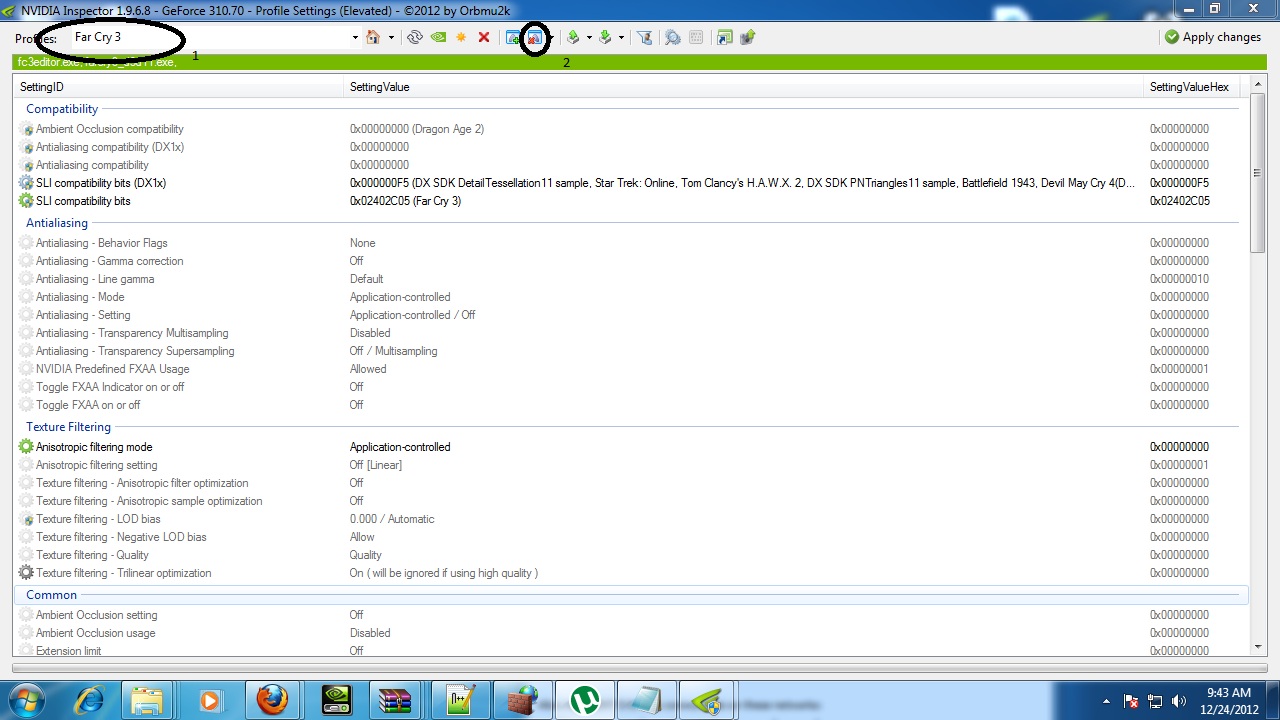

5.IN CATEGORY SLI COMPATIBILY BITS REMOVE EXISTING LINE THEN PASTE THE FOLLOWING
0x02402C05 (Far Cry 3)
CLICK APPLY CHANGES
Special Thanks: Arioch, People who helped figure out issue
0x02402C05 (Far Cry 3)
CLICK APPLY CHANGES
Special Thanks: Arioch, People who helped figure out issue
Friday, December 14, 2012
Burnout Paradise
Fix by Eincrou
Updated December 29, 2012
Updated December 29, 2012
Created using Steam version. Game version 1.0.0.1.
Description
Burnout Paradise is rated "Good" on NVIDIA's stereoscopic compatibility list, but I would personally rate it "Excellent." The game renders very well without fixes, and like any racing game, benefits a lot from being viewed in S3D.
Actually, it probably benefits even more since it's a destruction game and you can send light posts, mailboxes, railings and assorted other bits of debris flying out of your screen. Unfortunately you can't see what it's like to have a pedestrian flying out at you, I'm sad to say. The city's sidewalks are completely barren in this game. Oh, well.
What's one thing that's always great to have when you're playing a game in S3D? If you're like me and play with a deep world, it's always handy to have the HUD rendering with depth. It reduces the amount of muscle movement needed for the eyes to focus on the HUD and then refocus back to the game world.
A 2D UI isn't intolerable, but it certainly isn't optimal. This fix makes the entire user interface render in 3D and removes some bad effects.
This fix solves:
- All menus, the HUD, texts and the minimap render with depth.
- 2D smoke from skidding/crashing disabled.
- Headlamps causing halos/ghosting/doubling disabled.
Problems not fixed:
- All issues addressed.
- I wish I could fix the smoke and headlamp effects, rather than disable them, but I don't know how.
Change log:
- v2: (12/29/2012) 2D smoke effects and headlamps disabled.
- v1: (12/14/2012) Initial fix for UI depth.
How to Get It Working
Extract the zip file to the same location as BurnoutParadise.exe. For me this is:
[...]\Steam\steamapps\common\Burnout(TM) Paradise The Ultimate Box\
Download
- HelixMod-BurnoutParadise_v2.zip (Includes release dll)
Thursday, December 13, 2012
Darksiders (2010)
Fix by Eincrou
Updated December 18, 2012
Updated December 18, 2012
Created using Steam version. Game version 1.1.
Description:
Darksiders is rated "Excllent" in NVIDIA's compatibility list, and despite my skepticism of their "Excellent" ratings after the stereoscopic disaster that is Dark Messiah of Might and Magic, I actually agree with them for once.
The game looks incredible in S3D and has few problems with anomalies. The anomalies are either intermittent or not too bothersome. Look at the "Problems not fixed" section for my report on the anomalies.
The biggest problem is the 100% 2D UI, especially the targeting reticles for War's various ranged weapons. I've had nothing but failure for the past five or six games I've tried to fix, but I was finally able to make something happen with Darksiders. I tried to address the 2D UI, though my success remains incomplete.
This fix:
- Menus render with depth. I gave the text slightly less depth than the menu art. Why? Because it looks awesome. That's why.
- Depth for texts, including subtitles, can be turned off with the comma key ( , ) and turned back on with period key ( . ). These keys can be changed in DX9Settings.ini. Use this webpage for the key code numbers (middle column).
- HUD, including crosshairs, have depth.
- Mini-map has depth.
Problems not fixed:
- The HUD renders strangely, but I got around this by finding the texture elements of each crosshair. They are given as much depth as possible before the edges start clipping. One element, a pulsing circle, was left alone because that texture is reused many times.
- Skyboxes render too shallow. No acceptable solution has been found yet.
- Various effects do not render identically in both eyes - for example, the swirls around the rim of portals, the swirl around Void Walker on War's arm, fire on flaming skeletons, the chain around War's hand when Abyssal Chain is equipped, and several more.
- Portals have a rim effect, which renders in only the left eye.
- Portals show you what is on the other side when you look into them, but the world beyond the portal renders at the wrong depth.
Change Log:
- v4: (12/16/2012)
- Fixed crosshair for Angel-blaster-gun-thing. There's one other ranged weapon in the game, a demon-explosive-spike-throwing-thing, but it appears in only one brief part of the game. I have no save game to get back there, so it remains unfixed.
- v3: (12/15/2012)
- Increased depth of crosshairs for five ranged weapons. Depth fix for crosshair of final ranged weapon coming soon. There isn't as much depth as I would like, but the textures start clipping if I go any higher. If you have any suggestions for correcting this, let me know.
- Increased depth of enemy target indicators
- Changed default secondary depth setting for text (pressing the , key) from 2D to a slight bit of pop-out.
- v2: (12/14/2012)
- Add ability to set text to 2D. Useful for prerendered 2D cutscenes.
- v1: (12/10/2012)
- Initial Fix
How to get it working:
- Extract the fix into the same location as DarksidersPC.exe. For me, this is: [...]\Steam\steamapps\common\Darksiders
- Four of the fixed vertex shaders are personal to each system. You will have to download the debug version of d3d9.dll to dump them.
- Rename the release version of d3d9.dll that you extracted from the fix zip to something temporary. I like to use d3d9r.dll.
- Extract the debug version to the same directory as DarksidersPC.exe.
- Boot the game, and you should see red text at the top of your screen. If not, ensure that the d3d9.dll in your Darksiders folder is the debug version.
- Load into the game, and enter the equipment menu.
- Now, use the debugger's hotkeys to search for the shaders we need. Use NUM5 to advance and NUM4 to decrease. I recommend going to about VS#100 and if you don't find the element, go backwards and you should hopefully find it in the 400s.
- Look for the following elements to turn off: [1] texts, [2] menu art, [3] sword XP progress bar, and [4] green part of the health bar.
- Each time you select a VS that turns off one of these elements, write a note with what that element is, and the eight-digit CRC. The CRC is the characters after the "0x" part.
- When you find all four, exit the game and go into the ShaderOverride/VertexShaders directory and find the following text files: [1] 826E8EA7, [2] F516508B, [3] DA3DFC7A, [4] E3832F4F.
- Rename each of these filenames to the corresponding CRC you wrote down. If you need to be extra sure of what the fixed CRCs do, you can open up the text files see my comments.
- Now, when you relaunch the game you should find that these four interface elements render with depth. If not, double check that you have properly located each of your personal CRCs and matched them to the fixed CRCs.
- When all is working, delete or rename the debugging d3d9.dll, and rename the release version to d3d9.dll.
IMPORTANT! I need feedback on the following:
- I created this fix while running my graphics card in dual-GPU mode. I tried running the fix while in single-GPU mode, and the fix caused the game's graphics to become corrupted when 3D was enabled. I need to know if this affects people running with one GPU. I'd also like to know if it doesn't affect SLI users. In short, TESTERS NEEDED!
Download:
HelixMod-Darksiders_v4.zip (Release and debugging DLLs included)Thursday, December 6, 2012
MIASMATA
Miasmata
by 3D4DD
by 3D4DD
BEFORE | AFTER |
Fixed: skybox, water (by profile), HUD and godray presets
Attention: The correct depth of the sky and HUD elements depends on the correct convergence setting that is automatically choosen when You start the game. I don't recommend to change this value.
Installation: Extract the content of the zip file into the folder where Miasmata.exe is installed.
To fix issues with transparent water either rename Miasmata.exe to aion.exe or add Miasmata.exe to the Aion-Profile using NVIDIA Inspector. Choose the lowest quality for water in the games's graphic settings.
Usage:
There are hotkeys that change the depth of the HUD and the appearance of godrays. As the godrays are 2D they may cause irritation in some situations. So I've included the option to make the godrays look more diffuse so that it looks like a layer of haze (see image comparison)!. It seems better to me than removing the godrays completely.
Hotkeys:
0 default settings: HUD at arm`s length and original godrays
9 diffuse godrays
8 HUD at max depth (for triangulation)
7 HUD at arm's length
Thanks a lot to eqzitara and DHR for making the essential shader fix!
SHADEROVERRIDE
Tuesday, December 4, 2012
GUIDE: How to bind a custom convergence/depth settings[Cycle] to a key of choosing.
GUIDE: How to bind a custom convergence/depth settings[Cycle] to a key of choosing.
Step 1: Download file. HERE
Step 2: Find game's .exe. Extract into same folder / One level up/ AND In any folder labeled BIN.
Step 3: Start game and Test U key and make sure key cycles.
If this does not work either game is not DX9, Installed incorrectly, or is incompatible.
Step 4: Find your preset 1 situation. Now click U and adjust your depth/convergence and save with F7, repeat up to three times.
ADVANCED USERS ONLY[YOU ARE ON YOUR OWN]
Optional
[1]
If you want to use only 2 keys. Open your dx9settings.ini
CHANGE
Presets = 12;13;14;
TO
Presets = 12;13;
[2]
If you want a different KEY to activate open dx9settings.ini
Change the 85 in...
Key = 85
To a different Key. Use this ASCII CHART HERE. Look at at Capital letters in DEC section. Please keep in mind not all keys are compatible. If you want the letter O it would look like...
Key = 79
Step 1: Download file. HERE
Step 2: Find game's .exe. Extract into same folder / One level up/ AND In any folder labeled BIN.
Step 3: Start game and Test U key and make sure key cycles.
If this does not work either game is not DX9, Installed incorrectly, or is incompatible.
Step 4: Find your preset 1 situation. Now click U and adjust your depth/convergence and save with F7, repeat up to three times.
ADVANCED USERS ONLY[YOU ARE ON YOUR OWN]
Optional
[1]
If you want to use only 2 keys. Open your dx9settings.ini
CHANGE
Presets = 12;13;14;
TO
Presets = 12;13;
[2]
If you want a different KEY to activate open dx9settings.ini
Change the 85 in...
Key = 85
To a different Key. Use this ASCII CHART HERE. Look at at Capital letters in DEC section. Please keep in mind not all keys are compatible. If you want the letter O it would look like...

Key = 79
-----
THIS IS FOR CODERS
BY MANA84
It has a small flaw where it may leave a . after the output like Texcoord1 o2[.] just make sure to check if it does that then remove it. Should save some time if doing an old game. Make sure to remove preshader lines if it has any before hand as well. Just drag and drop.
FILE HERE
BY MANA84
It has a small flaw where it may leave a . after the output like Texcoord1 o2[.] just make sure to check if it does that then remove it. Should save some time if doing an old game. Make sure to remove preshader lines if it has any before hand as well. Just drag and drop.
FILE HERE
Saturday, November 24, 2012
Family Guy Back to the Multiverse
The game is really fun, same jokes from the tv serie.
Have toyification effect (increase convergence)
The game is a mess with shaders...so no everything is fixable. I have to use a none conventional fix for push thing in to depth.
SCREENSHOTS
Fix:
- Crosshair (HUD also 3D)
- Target Icons/Names 3D
- Sky, clouds and Stars now in the right depth
- Background Buildings now in the right depth
- Apocalyptic Sky now in the right depth
Remaining issues:
- Moon Flickering, minor (share the same shader/one texture of the sky)
- Minor Lights problems
- Papers you pick up have wrong borders, minor (share the same shader/one texture of the sky)
Instructions:
- Extract .zip where .exe is located
Download Here
3DTV users: This game dont go in to 3D mode with 3DTV play, you have to use the Chiri's wrapper to force refresh rate to 59hz......if you have problems to not going in to 3D mode make a comment.
3DTV users: This game dont go in to 3D mode with 3DTV play, you have to use the Chiri's wrapper to force refresh rate to 59hz......if you have problems to not going in to 3D mode make a comment.
Sunday, November 18, 2012
Scania Truck Driving Simulator by 3D4DD
Scania Truck Driving Simulator by 3D4DD
BEFORE | AFTER |
Scania Truck Driving Simulator
Fixed: Skybox, depth/convergence presets for the different views (combined with the default key assigment for the game: 1, 2, 3,…, 7)
Remaining Issues: Sun at wrong depth , 2D HUD elements (not fixed as these shaders also affect other objects and are not too irritating to me)
Attention: I don't recommend to change the depth/convergence presets as this also will change the depth of the skybox
Installation: Extract the content of the zip file in the folder where scania_truck_driving_simulator.exe is installed (e.g. ...\SCANIA Truck Driving Simulator\bin\win_x86\).
SHADEROVERIDE
Usage: The method to fix the depth of the skybox worked for me only with the debug.dll that is included in the zip file. This means that there is a debug text info when You start the game. To turn it off press F11.
You may also try to use the actual release.dll. You can download it in this blog and replace with it the d3d9.dll of the fix. Maybe it works on Your PC and You don't have to press F11 to turn off the text info.
Thanks a lot to DHR who made the essential shader fix!
Friday, November 16, 2012
Rise of Flight by lefuneste
Rise of Flight by lefuneste
Description Transform icon,labels and jauges in 3D Also made 3d menu and maps Three depths/convergence settings
How to install without JGMSE unzip Helix_Rof in the Rise of flight game install directory with JGMSE unzip Helix_Rof in the Rise of flight JGMSE Mod directory
How to use Unselect "post effect" in Rise of flight graphic settings (not compatible with 3dvision) Launch "Rise of flight" => text is now in 3d use the left arrow to select low detph settings (best for using the GUI before flight) Select your mission/campaign while in cockpit use the up arrow to select normal depth settings while in external view use the right arrow to select special "scale model" convergence
How to change depth/convergence settings Select the settings you want to change (left arrow or up arro or right arrow) use the key defined in nvidia control panel to change the depth/convergence press CRTL + F7 to save the settings for the selected key
How to change the binding of preset keys Edit the DX9Settings.ini file in the data directory in rise of flight install dir Modify the line "Preset1Key = 37" by replacing the number "37" with the number you will find here: http://msdn.microsoft.com/en-us/library/windows/desktop/dd375731%28v=vs.85%29.aspx (you will have to convert the hex number in decimal). This will change the key for the preset 1. Do the same for the lines Preset2Key and Preset3Key
How to uninstall the Helix Mod without JGMSE delete data\ShaderOverride\ data\DX9Settings.ini bin_game\release\d3d9.dll in the "rise of flight" directory
with JGMSE deactivate Helix_Rof_JMSGE in JGMSE
Description
Transform icon,labels and jauges in 3D
Also made 3d menu and maps
Three depths/convergence settings
How to install
without JGMSE
unzip Helix_Rof in the Rise of flight game install directory
with JGMSE
unzip Helix_Rof in the Rise of flight JGMSE Mod directory
How to use
Unselect "post effect" in Rise of flight graphic settings (not compatible with 3dvision)
Launch "Rise of flight" => text is now in 3d
use the left arrow to select low detph settings (best for using the GUI before flight)
Select your mission/campaign
while in cockpit use the up arrow to select normal depth settings
while in external view use the right arrow to select special "scale model" convergence
How to change depth/convergence settings
Select the settings you want to change (left arrow or up arro or right arrow)
use the key defined in nvidia control panel to change the depth/convergence
press CRTL + F7 to save the settings for the selected key
How to change the binding of preset keys
Edit the DX9Settings.ini file in the data directory in rise of flight install dir
Modify the line "Preset1Key = 37" by replacing the number "37" with the number you will find here: http://msdn.microsoft.com/en-us/library/windows/desktop/dd375731%28v=vs.85%29.aspx
(you will have to convert the hex number in decimal).
This will change the key for the preset 1.
Do the same for the lines Preset2Key and Preset3Key
How to uninstall the Helix Mod
without JGMSE
delete
data\ShaderOverride\
data\DX9Settings.ini
bin_game\release\d3d9.dll
in the "rise of flight" directory
with JGMSE
deactivate Helix_Rof_JMSGE in JGMSE
Wednesday, November 14, 2012
SERIOUS SAM 3 BFE -NON-SLI USERS-
This is a temporary page. I am aware game has issues with non-sli users. I need to work on a solution
Sine Mora
Sine Mora
By Chiri / Eqzitara
Two Part installation. Please follow instructions.
Part 1: [by Chiri] You can skip this step if game renders in 3D for you.
Game normally works only in windowed mode, which is difficult to get to render in 3D. Chiri developed a d3d9.dll to intercept calls and force certain settings such as full screen/60 hertz. Preset is 1280x720 @ 60hz. To change this open d3d9.ini and change to match your desired settings. The files should work on any dx9 windowed game so feel free to experiment.
Install to .../sinemora/
FILE HERE
Part 2:[by Eqzitara] OPTIONAL
Health bars are 2D. You can either force models to 2D(with glasses off) to compensate or install my fix.
Press F2: Change Depth of Health Bars
Press F3: Change Depth of Health Bars
Press F4: Remove Health Bars
Installation.
AFTER installing chiri's full screen fix. Rename the D3D9.DLL(part 1) to RES.DLL. Then follow this guide. http://helixmod.blogspot.com/2012/08/guidehow-to-install-helixmod-game-fixes.html
Install to .../sinemora/
SHADEROVERRIDE
Installation.
AFTER installing chiri's full screen fix. Rename the D3D9.DLL(part 1) to RES.DLL. Then follow this guide. http://helixmod.blogspot.com/2012/08/guidehow-to-install-helixmod-game-fixes.html
Install to .../sinemora/
SHADEROVERRIDE
I am Alive (Alternative)
I am Alive - 3D Vision fix(Alternative).
Fixed:
- Light;
- Shadows;
- Fog effects;
- effects Halos(water splashes);
- HUD, Target markers 3D;
- Ambient occlusion.
Screenshots gallery.
Remaining issues:
Unknown.
Instructions:
Download this archive. Unpack downloaded archive in to the "SYSTEM" game folder (example : "\Steam\steamapps\common\I am Alive\src\SYSTEM").
F2 - key switches(cycle) HUD depth (3 variants).
F3 - key switches (cycle) depth presets (2 variants).
Holding Mouse 2 key activate low separation preset (for good aiming from the gun)
If you want to save your custom convergence settings press F3 and select required preset, set custom separation/depth settings , then press F7 and your settings will be saved in the config file. You can set custom settings for both presets and for gun preset as well (when holding mouse button 2(aiming gun), set custom separation/depth settings and press F7. Release mouse button 2).
Tested only with steam version of the game. I'm using default game profile from R300 display driver.
You need at least R300 driver series to run this version of the fix.
Fixed:
- Light;
- Shadows;
- Fog effects;
- effects Halos(water splashes);
- HUD, Target markers 3D;
- Ambient occlusion.
Screenshots gallery.
Remaining issues:
Unknown.
Instructions:
Download this archive. Unpack downloaded archive in to the "SYSTEM" game folder (example : "\Steam\steamapps\common\I am Alive\src\SYSTEM").
F2 - key switches(cycle) HUD depth (3 variants).
F3 - key switches (cycle) depth presets (2 variants).
Holding Mouse 2 key activate low separation preset (for good aiming from the gun)
If you want to save your custom convergence settings press F3 and select required preset, set custom separation/depth settings , then press F7 and your settings will be saved in the config file. You can set custom settings for both presets and for gun preset as well (when holding mouse button 2(aiming gun), set custom separation/depth settings and press F7. Release mouse button 2).
Tested only with steam version of the game. I'm using default game profile from R300 display driver.
You need at least R300 driver series to run this version of the fix.
Friday, November 9, 2012
Grand Theft Auto IV
Grand Theft Auto IV - by mana84
BEFORE | AFTER |
Description:
- Crosshair is made 3d and a little transparent to aim better
- Doubling near water is fixed
- DX9Settings.ini is configured to use with dynamic convergence when you press 'right-click'
(just install autohotkey and doubleclick on "RightMouseBind.ahk")
10/11/2012 Update:
- a glitch related to cars 'squashing up' should be solved
I strongly suggest to disable shadows by ingame menu. This fix is compatible with other graphics mod like ENB or iCenhancer.
If you want to use a mod just rename the mod's d3d9.dll to "d3d9fx.dll" and edit the ProxyLib line (remove the comment '//' from behind) in DX9Settings.ini to point your game's installation folder, you should write something like that:
ProxyLib = C:\your_installation_folder\grand theft auto iv\GTAIV\d3d9fx.dll
How to install:
extract "GtaIV_fix.zip" archive in the "./GTAIV" directory of the game, required d3d9.dll is already included in the archive.
Download:
GtaIV_fix.zip
Wednesday, November 7, 2012
X-Men Origins: Wolverine
Time ago i look some screenshots of this game (its an old one) in 3dvisionlive.com (neocid user) and looks great, except for some problems in 3D. So, i get the retail version in a very low price and start to play and fix it...took me some time....almost 50 shaders fixed. The game is great and fun, have some nice S3D....in the video you can see the blood popping-out the screen (its youtube, dont expect some high quality video).
Fixed/Removed:
- Effects Fixed
- Halos Fixed
- Lights Fixed
- Character Shadows removed (you dont miss them...not that great).
Remaining issues:
- I suppose minor....i'm in the last chapter.....if i found something else i update.
Instructions:
- Extract the .zip content where .exe is located (.../Binaries/)
Donwload Fix
Monday, November 5, 2012
007 Legends
Fixed:
- Crosshair 3D, rest of the HUD 2D
- Objective icons 3D
- Lights/Bloom that render in 2D, now are 3D
- Some Ghosting fixed
- Waterfall Effect in the Biodome level fixed (Thanks to 3d4dd)
Remaining issue:
- Minor issue: Car's reflections on the ice ("Die Another Day"/"Ice Lake" Mission). Thanks 3d4dd for reporting...when i get to that mission i will look to it.
How to Install:
- Extract the content of the .zip where .exe is located
- Press "P" for suggested convergence
Download 3D Fix
GALLERY
Xbox360 Controller user:
The game have none support for controllers, so i made a Xpadder profile for it.....work same like Xbox (except for Enter = Start / Esc = Select). Also i made a short script on Xpadder that work like this (it's perfect for aiming):
Left trigger pressed = adjust the convergence to correct aim (lower convergence)
Left trigger unpressed = normal convergence
I made also a script on Xppader for any game with the same logic (only Left trigger action)....it can be used on any FPS game.
007 Legends Xpadder Profile
Enjoy!
Monday, October 29, 2012
Dark Souls Prepare to Die Edition - 3D Vision fix
Dark Souls Prepare to Die Edition - 3D Vision fix.
Update:
- Auto detect resolution used in DSFix.
Update:
- 3D target marks;
- 3D Crosshair;
- HUD scale (optional. It's not the same as DSfix !)
Fixed:
- Water reflection;
- fire/water Halos;
- some effects;
Screenshots.
Instructions:
Download this archive(smaller HUD version) or this one(original HUD size) and unpack it in to "DATA" folder of the game (example : "C:\Steam\steamapps\common\Dark Souls Prepare to Die Edition\DATA").
Don't use mine scaled HUD version with DSfix scaled HUD or all interface will be messed up (you can disable DSfix scaled HUD in DSfix.ini file, enableHudMod 0 line).
What the difference between my version of HUD and DSfix version ?
My version of scaled HUD doesn't have interface flicking and boss health bars are ok.
If you've changed AA in the game via Nvidia inspector - read this.
F1/F2/F3 - keys switch HUD depth.
F4/F5 - switch convergence/separation settings (I use them for change separation for cut scenes).
If you want to save your custom convergence settings press F4(or F5) set custom settings , then press F7 and your settings will be saved in the config file. You can set custom settings for both profiles (F4/F5 keys).
Tested only with steam version of the game.
The fix can be not complete, because I didn't go through whole game(Will be updated permanently).
If you have any issue with missing textures disable in-game AA.
Update:
- Auto detect resolution used in DSFix.
Update:
- 3D target marks;
- 3D Crosshair;
- HUD scale (optional. It's not the same as DSfix !)
Fixed:
- Water reflection;
- fire/water Halos;
- some effects;
Screenshots.
Instructions:
Download this archive(smaller HUD version) or this one(original HUD size) and unpack it in to "DATA" folder of the game (example : "C:\Steam\steamapps\common\Dark Souls Prepare to Die Edition\DATA").
Don't use mine scaled HUD version with DSfix scaled HUD or all interface will be messed up (you can disable DSfix scaled HUD in DSfix.ini file, enableHudMod 0 line).
What the difference between my version of HUD and DSfix version ?
My version of scaled HUD doesn't have interface flicking and boss health bars are ok.
If you've changed AA in the game via Nvidia inspector - read this.
F1/F2/F3 - keys switch HUD depth.
F4/F5 - switch convergence/separation settings (I use them for change separation for cut scenes).
If you want to save your custom convergence settings press F4(or F5) set custom settings , then press F7 and your settings will be saved in the config file. You can set custom settings for both profiles (F4/F5 keys).
Tested only with steam version of the game.
The fix can be not complete, because I didn't go through whole game(Will be updated permanently).
If you have any issue with missing textures disable in-game AA.
Friday, October 26, 2012
Dishonored - 3D Vision fix
Dishonored - 3D Vision fix.
Update:
Fixed remaining water/fog effects.
Update:
Added 3D crosshairs support for 1680x1050 resolution.
Added 3D crosshairs correction for mask optic.
Update:
Added few more 3D crosshairs.
Update:
Fixed some glass effects (report if it breaks some other effects).
Removed cut-off for distant lights (this can cause other issues - report if you will find that it brake something).
Update:
I'm continuing testing features of the new dll.
This time added 3D crosshair(exactly 3D with auto fit to the scene depth).
I'm still at beginning of the game so maybe I've fixed not all of crosshairs(Post your comment if you find one).
Fixed:
- Light effects;
- Shadows;
- distant Fog;
- effects Halos;
- HUD;
Remaining issues:
I didn't split crosshair from other HUD, maybe I will do that in future.
But it isn't a big problem you can always turn crosshair off in game settings.
This is not usual fix.
This fix implements new scripting feature (for test !) and fix all shaders by script template automatically !
That means there can be some broken effects(let me know in comments if you find some), but I'm almost sure it fixes almost everything.
Instructions:
Download this archive. Unpack downloaded archive in to the game folder (example : "Steam\steamapps\common\Dishonored\Binaries\Win32").
When you run the game the fix will search in the game shaders and will fix them automatically and this will take some time. Probably you will see black screen for 10-15 sec. It's unreal engine and it fixes about 600 shaders, so be patient :)
F1/F2/F3 - keys switch HUD depth.
F5/F6 - switch convergence/separation settings .
If you want to save your custom convergence settings press F5(or F6) set custom settings , then press F7 and your settings will be saved in the config file. You can set custom settings for both profiles (F5/F6 keys).
Tested only with steam version of the game. I'm using default game profile from 306.97 display driver.
You need at least R300 driver series to run this version of the fix.
Update:
Fixed remaining water/fog effects.
Update:
Added 3D crosshairs support for 1680x1050 resolution.
Added 3D crosshairs correction for mask optic.
Update:
Added few more 3D crosshairs.
Update:
Fixed some glass effects (report if it breaks some other effects).
Removed cut-off for distant lights (this can cause other issues - report if you will find that it brake something).
Update:
I'm continuing testing features of the new dll.
This time added 3D crosshair(exactly 3D with auto fit to the scene depth).
I'm still at beginning of the game so maybe I've fixed not all of crosshairs(Post your comment if you find one).
Fixed:
- Light effects;
- Shadows;
- distant Fog;
- effects Halos;
- HUD;
Remaining issues:
I didn't split crosshair from other HUD, maybe I will do that in future.
But it isn't a big problem you can always turn crosshair off in game settings.
This is not usual fix.
This fix implements new scripting feature (for test !) and fix all shaders by script template automatically !
That means there can be some broken effects(let me know in comments if you find some), but I'm almost sure it fixes almost everything.
Instructions:
Download this archive. Unpack downloaded archive in to the game folder (example : "Steam\steamapps\common\Dishonored\Binaries\Win32").
When you run the game the fix will search in the game shaders and will fix them automatically and this will take some time. Probably you will see black screen for 10-15 sec. It's unreal engine and it fixes about 600 shaders, so be patient :)
F1/F2/F3 - keys switch HUD depth.
F5/F6 - switch convergence/separation settings .
If you want to save your custom convergence settings press F5(or F6) set custom settings , then press F7 and your settings will be saved in the config file. You can set custom settings for both profiles (F5/F6 keys).
Tested only with steam version of the game. I'm using default game profile from 306.97 display driver.
You need at least R300 driver series to run this version of the fix.
Thursday, October 18, 2012
Hunted: The Demon's Forge =Helix Update=
BY HELIX/EQZITARA
VIDEO PREVIEWS ARE OUTDATED(SHADOWS WORK NOW)
Helix update: Shadows fixed.
Rating: Excellent
Fixed: Crosshair, effects,shadows
Issues Remaining: Some hud elements
Issues Remaining: Some hud elements
INSTALL TO ..\Hunted - The Demons Forge\BINARIES\WIN32
SHADEROVERRIDE
This game is extremely underrated [SEE VIDEO]. Give it a chance, 3D is amazing and story/graphics are surprisingly good.
Optional: AA Makes the game look much better. I use 4SGSSMS. If you have trouble getting AA to work rename to p4dftre.EXE
This game is extremely underrated [SEE VIDEO]. Give it a chance, 3D is amazing and story/graphics are surprisingly good.
Optional: AA Makes the game look much better. I use 4SGSSMS. If you have trouble getting AA to work rename to p4dftre.EXE
Kings Bounty: Warriors of the North
Rating: Great
Fixed: Water
Issues Remaining: Hud/mouse is 2d.
OPTIONAL/ HIGHLY RECOMMENDED
Press . then save convergence/depth setting in battle.(F7)
Press , then save convergence/depth setting out of battle.(F7)
Press . when in battle Press , when out of battle
Install to ../King's Bounty - Warriors of the North/
Wednesday, October 17, 2012
Viking:Battle for Asgard
REMOVED: 2D sky box
GAME IS CAPPED AT 30 FPS! This is a bit of a deal breaker for many but is only $15.00 and looks amazing in 3d and graphics are pretty good. Its so unfortunate because everything in game renders perfectly in 3d. Shadows/hud/etc. Only issue was skybox but I couldnt seem to get it to work so I just removed it(didnt try too hard to be honest but it wont be missed).
Leave a comment if anyone finds out if/how 30 FPS lock is bypassed.
install to ../Viking Battle for Asgard/
SHADEROVERRIDE
Resident Evil: Raccoon City BY CHIRI[UNLOCKER] / EQZITARA
BY CHIRI[UNLOCKER] / EQZITARA
Rating: Excellent
Fixed: Convergence Unlocked[Chiri]
Removed: 2D Lensflare effect, Depth of field, motion blur[Eqzitara]
Convergence unlocker works on many games. Including RE5, to download CHIRI'S UNLOCKER seperate. Please go HERE
If you want to read my thoughts on game go check my blog HERE
If you want to read my thoughts on game go check my blog HERE
REQUIRED INSTALLATION.
INSTALL VERSION 1.2!
3D VISION SUPPORT WAS ADDED IN VERSION 1.2. IF YOU HAVE A STEAM VERSION PLEASE IGNORE THIS
SHADOWS/LIGHTING
High convergence will effect self shadows/lighting..Go as high in depth as possible then find optimal convergence setting. Please reduce if they appear too off.
INSTALL TO:../ Resident Evil Operation Raccoon City/
Tuesday, October 9, 2012
Chiri's force certain resolution/hertz/fullscreen
By Chiri:
Tool was made to force certain resolutions/hertz/fullscreen in games that do not allow 3D TV PLAY/VISION to function. This is NOT compatible with every game.
Download here
Tool was made to force certain resolutions/hertz/fullscreen in games that do not allow 3D TV PLAY/VISION to function. This is NOT compatible with every game.
Download here
Thursday, October 4, 2012
Tony Hawks Pro Skater HD
I don't know if anyone is interested on this game.....but i post it anyways.
I play Tony Hawks series years ago....really great game, i spend many hours playing this game....well and drinking beer. Now i can play it HD and 3D.....the game have none graphics options, so clearly is a port....but the game keeps all the fun of the original (brought me good old memories :) ). The Music is great like always. I want to upload a video but i dont have to much time and i really suck right now.
Have Fun!
Fixed/Removed:
- Some Casted shadows removed
- Ghosting Fixed (water, vapor, others)
Instructions:
- Extract the content of the .zip where .exe is located
- Press F6 to suggested convergence value
Download Fix
GALLERY
Transparent HUD custom key version: Download Here
Press "O" --> Transparent HUD (50%)
Press "P" --> Normal HUD (Default)
Saturday, September 15, 2012
Black Mesa [Complete]
Rating: Excellent
Fixed: Reflections/refractions/depth of water based objects[some water clips on edges], Gun no longer in Depth(see optional)Issues Remaining: Some water clips on edges, outdoor areas have some elements at wrong depth.
Optional:
Depth hud(crosshair/hud) Press O to Enable. P to Disable
Weapon convegence Adjuster[Recommended]. Press . to Enable. , to Disable
Light Glow(If you want gone/experience ghosting) Press F2 to Enable F3 to Disable
Installation
Install to...\steam\steamapps\YOUR USER NAME\source sdk base 2007\bin
FILE 1
Install to.....\steam\steamapps\YOUR USER NAME\source sdk base 2007\
FILE 2
To enable *ACCURATE* Laser Sight
Download Nvidia inspector. Start it. Click the wrench/screwdriver icon.
Click scroll box. Find half life 2. Remove hl2.exe from half life 2's profile. Now use scroll bar and select mass effect 2. Click the + button. Navigate to ..steam\steamapps\YOUR USER NAME\source sdk base 2007\. Select Hl2.exe and Save.. If you want sli/aa... SLI is 0x00402005 AA is 0x00000018 PICTURE

Start game(Full screen). Enable Developer Console(~).In console type. crosshair 0
Enable Laser Sight. Play....
Alternated method
Instructions on changing laser sight are in comments.
To increase/decrease gun convergence.
Open ..steam\steamapps\YOUR USER NAME\source sdk base 2007\shaderoverride\vertexshaders\F5BB7939.txt
Look for def c254, 0, 100, 0.0625,0
Change the 100 value to something higher for popout.
Change the 100 value to something lower for less popout.
Special Thanks: 3DVISION-BLOG(Bookmark it)
Thursday, September 13, 2012
Darksiders II - Alternative 3D Vision fix
Darksiders II - 3D Vision fix.
Fixed:
- Light effects;
- Shadows;
- fire/water/fog/effects Halos;
- Map/3D Aim cursor and 3D HUD (Experimental ! Please report if it works for you or not. HUD by default is 2D use hot-keys to switch depth. It's a test of alternative CRC32 calculation for shader with debug info/comments)
Remaining issues:
Enemy pointers and healths at the same depth as HUD.
Them can't be splitted as crosshair because of the text (enemy name).
Maybe more - still WIP !
Instructions:
Download this archive if you're using game version 1.1 or below. Or This archive for later version. Unpack downloaded archive in to the game folder (example : "C:\Steam\steamapps\common\Darksiders 2").
F2/F3/F4 - keys switch HUD depth.
F5/F6 - switch convergence/separation settings (I use them for change separation for cut scenes).
If you want to save your custom convergence settings press F5(or F6) set custom settings , then press F7 and your settings will be saved in the config file. You can set custom settings for both profiles (F5/F6 keys).
Tested only with steam version of the game. I'm using default game profile from 301.42 display driver.
You need at least R300 driver series to run this version of the fix ( recommended 301.42 ).
The fix can be not complete, because I didn't go through whole game(Will be updated permanently).
If you experience stuttering.
Go to this link and download file HERE. [Works for Darksiders 2]
To use this stuttering fix with Helix's patch follow directions HERE.
OR
Go into nvidia control panel->manage 3d settings->Maximum Pre-Rendered Frames[2]
Fixed:
- Light effects;
- Shadows;
- fire/water/fog/effects Halos;
- Map/3D Aim cursor and 3D HUD (Experimental ! Please report if it works for you or not. HUD by default is 2D use hot-keys to switch depth. It's a test of alternative CRC32 calculation for shader with debug info/comments)
Remaining issues:
Enemy pointers and healths at the same depth as HUD.
Them can't be splitted as crosshair because of the text (enemy name).
Maybe more - still WIP !
Instructions:
Download this archive if you're using game version 1.1 or below. Or This archive for later version. Unpack downloaded archive in to the game folder (example : "C:\Steam\steamapps\common\Darksiders 2").
F2/F3/F4 - keys switch HUD depth.
F5/F6 - switch convergence/separation settings (I use them for change separation for cut scenes).
If you want to save your custom convergence settings press F5(or F6) set custom settings , then press F7 and your settings will be saved in the config file. You can set custom settings for both profiles (F5/F6 keys).
Tested only with steam version of the game. I'm using default game profile from 301.42 display driver.
You need at least R300 driver series to run this version of the fix ( recommended 301.42 ).
The fix can be not complete, because I didn't go through whole game(Will be updated permanently).
If you experience stuttering.
Go to this link and download file HERE. [Works for Darksiders 2]
To use this stuttering fix with Helix's patch follow directions HERE.
OR
Go into nvidia control panel->manage 3d settings->Maximum Pre-Rendered Frames[2]
Friday, September 7, 2012
I Am Alive
6xx series users: only if you get an "NOT SUPPORTED" message.
- Edit UserSettings.ini under [SystemValidation] change RunValidation=True to RunValidation=False
3DTV Play users: With this the game goes in to 3D mode.
- Edit UserSettings.ini change MaxRefreshRate=60 to MaxRefreshRate=59
Xbox360 Wireless users: Don't work properly in this game.
- I made a profile with xpadder, donwload HERE
- Ingame configuration, disable controller
Instructions (3D Fix):
- Extract the content of the .zip where .exe is located (...\I Am Alive\src\System)
- Ingame, press F6 to suggested convergence value
Fixed/Removed:
- Characters/Water/Light Ghosting Fixed
- Some Shadows Removed
- HUD Fixed (2D Menu, enemy icons 3D, others stuff 3D)
- DOF/Blurry Effect Removed, the game look great without them.
Remaining Issues:
- Godrays in some parts, it's not big deal....i tested in 2D and looks worst lol.
Download Fix
GALLERY
Thursday, August 23, 2012
GUIDE:How to install helixmod game fixes and other d3d9.dll mods.[Example Dark Souls 2]
How to install helixmod game fixes and other d3d9.dll mods.[Example Dark Souls]
This is a guide to explain how to install helix's 3d vision wrapper and other d3d9.dll mods (ENB/FXAA/ ETC). This may not always work, I dont believe a d3d9.dll mod has ever not worked with helixmod but its a possibility.
Game example used:
Resolution upscale mod by DURANTE(NOT AFFILIATED TO HELIXMOD, please show support for modder on linked thread.)
Directions
Short version
Install non-helix mod first
Rename mod's d3d9.dll to res.dll
Install Helix Mod 3D Vision Fix
Open dx9settings.ini in notepad.(If not included please see long version)
Under [general] section add the following line(Change install directory to match your own. Only add useendscene line if not already included in [general] section)
ProxyLib = C:\Steam\steamapps\common\Dark Souls Prepare to Die Edition\DATA\res.dll
File should read(if install directory is the same).
[General]
ProxyLib = C:\Steam\steamapps\common\Dark Souls Prepare to Die Edition\DATA\res.dll
Save.Exit.Play
Long Version
Short version
Install non-helix mod first
Rename mod's d3d9.dll to res.dll
Install Helix Mod 3D Vision Fix
Open dx9settings.ini in notepad.(If not included please see long version)
Under [general] section add the following line(Change install directory to match your own. Only add useendscene line if not already included in [general] section)
ProxyLib = C:\Steam\steamapps\common\Dark Souls Prepare to Die Edition\DATA\res.dll
File should read(if install directory is the same).
[General]
ProxyLib = C:\Steam\steamapps\common\Dark Souls Prepare to Die Edition\DATA\res.dll
Save.Exit.Play
Long Version
Always install the non-helixmod d3d9.dll first. In this case Resolution Upscale Mod. Follow the mods instructions and Install to the directory you should. Then Confirm it works in-game.
Now rename the d3d9.dll to something else. In this example we use RES.DLL.
Now install the helix mod patch in same directory. Our installs are usually labeled SHADEROVERIDE. Install to same directory. Confirm it works in game(The other mod will not work yet)
Now their should be a file labeled DX9SETTINGS.INI that was included with the helixmod patch. Dark souls 2 does include one.
If no dx9settings.ini is included
Add this file DX9SETTINGS.INI and add to same folder as the d3d9.dll
Open the dx9settings.ini. First Line should read..
[General]
Add a new line after general(press enter, do not remove anything). Make sure that no line in general section reads useendscene = false. If it does already please do not add that line again.
proxylib =
Now after proxylib = Add your directory and put what you named the mod. In this case RES.DLL. It should read some thing like..
[General]
ProxyLib = C:\Steam\steamapps\common\Dark Souls Prepare to Die Edition\DATA\res.dll
ProxyLib = C:\Steam\steamapps\common\Dark Souls Prepare to Die Edition\DATA\res.dll
Save. Start game. PLAY.
IMPORTANT NOTE; IN CERTAIN GAME ENGINES LIKE UNREAL ENGINE 3 YOU NEED TO MAKE A COPY OF YOUR DX9SETTINGS.INI AND PASTE IT 1/2 LEVELS UP... SO DO IT IN ALL.
Fable 3
RATING: Great
Removed: 2D Reflections(INI),Motion Blur(INI), Depth of field
Issues remaining: In snowy climates snow swirl is 2d effect, Menu Screen.
HOW TO FIX WATER
Start Game up till you gain control of character... ALT TAB.(No joke)
INI TWEAKS(reflections/motion blur)
Go to .. Fable 3/VideoOptionsConfig.xml
Change the following
<RadialBlurMinimumEffectsDetail>99</RadialBlurMinimumEffectsDetail>
<MotionBlurMinimumEffectsDetail>99</MotionBlurMinimumEffectsDetail>
<ReflectionTextureResolution>0,0,0,0,0</ReflectionTextureResolution>
This is more of ini tweaks then actual fix since I ran into a lot of odd trouble anywho... Game looks good in 3D and I knew of a few ini tweaks. People bash this game more then they should. Fable 1 is still way better but I dont regret playing through this game once however..... being evil makes no sense story wise(DONT DO IT).
Install to.. Fable 3/
SHADEROVERRIDE
PS am I the only one that finds it odd that there is unused 3d vision code in the game?
Darksiders 2
First i want to thanks eqzitara, half the credits go to him.
Update 21/08:
- Sky Fix
Fixed/Removed:
- Shadows removed (game looks better without shadows)
- Some effects removed and others fixed
- Ghosting fixed
- No Reflections flickering (at least i play severals hours and dont have this problem, please comment if you have this problem)
Remaining issues:
- icons enemies and crosshairs 2D (its not a big deal and difficult to fix for everyone)
- minor problems
Notes:
- Dont install the patch 1.01 I install this patch an can't go further in game in some point, so i have to unistall and install the game again without it.
Instructions:
- Rename .exe to "bmgame.exe" or use the Batman AA profile with Nvidia inspector (i try 5 profiles and this one get the best results. first i use the darksider 1 profile)
- Extract the content of the .zip where .exe is located.
I still playing this game, so if i find others problems and i can fixed i update the file.
Download Fix
GALLERY
Thursday, August 16, 2012
Saturday, August 11, 2012
HOW TO UNLOCK CONVERGENCE IN "LOCKED" GAMES
HOW TO UNLOCK CONVERGENCE IN "LOCKED" GAMES
BY CHIRI:
RESIDENT EVIL 5 BEFORE | RESIDENT EVIL 5 AFTER |
INVERSION BEFORE | INVERSION AFTER |
Explanation:
Certain 3D Vision Games believe its best to set a convergence(pop-out) restriction on games for the safety of the user. Some games may cap the game at a higher convergence value then you like or too little. Using this tool you can set the convergence to what you are comfortable with.
Tested:
Inversion [Gallery]
Resident Evil: Racoon City
LA Noire
Technical Information[This applies to L.A Noire]
1) No more dirty patching of a specific driver version DLL. The new nvapi.dll is a decorator(wrapper) to the original dll in the windows/system directory and should work with any driver version.
2) Not all convergence settings written by the game are ignored: The DLL reads a nvapi.ini file from the current directory which contains a convergence value mapping for conversion values which should be used to override the user set convergence value using hot keys.
Here is my nvapi.ini file for L.A. Noire:
[Logging]
Convergence=0
Separation=0
[ConvergenceMap]
Map1=from 3e99999a to 0.3
;Map2=from 3ffb4e53 to 2.0
Map2=from 3f800000 to 1.0
Map3=from 3f666666 to 0.9
The value 3ffb4e53 (= around 1.9) is the game setting for normal play settings. This is not mapped by the ini file (; = comment) and therefore overwritten with the user convergence file from hot-keys. The other entries map fixed game values like notebook view, title screen etc. which can be mapped to other values.
3) Logging of game value writes: If you set Convergence=1 in the ini file, all writes to convergence value from the game are logged into a text file. This allows you to find the values to set in [ConvergenceMap].
Note: I just dirty coded the DLL in a few minutes and only tested it for 5min in L.A.Noire. I might missing values for cut-scenes etc.
Installation
Extract NVAPI.ZIP into the same folder you launch the game from(the same folder as the games executable[.exe])
How to Help
If you find a game thats convergence locked at a value you are not comfortable with. Please try this tool and let us know in the comment section. If you are able and willing a gallery would be appreciated.(3dvisionlive.com).
Tool by: Chiri
Special Thanks: BertyGamer, ddorpm
Editor/Maintained by: Eqzitara
Friday, August 10, 2012
CRUSADER KINGS 2
CRUSADER KINGS 2
BY: ANDYSONOFBOB
Removed:
Dodgy Map Textures
Additional Information:
Unless you don't mind the 5 dodgy chancellors, you will need the Sword of Islam mod to replace the Western chancellor models with their Eastern counterparts. Do this by editing the avatar file in notepad++. Found:
C:\Steam\steamapps\common\crusader kings ii\interface\avatars.gfx
Find the various chancellor actorfiles, they all have job in their title e.g. westerngfx_job_spymaster
Look for the Muslim equivent and replace the Western .xac file for the Muslim one. Leave the idle one.
It should look like this:
EMFXActorType = {
name = "westerngfx_job_spiritual"
actorfile = "gfx\models\Mapindicators\Muslim_Mullah.xac"
idle = "gfx\models\Mapindicators\Western_lord_spiritual_idle.xsm"
scale = 1.0f
}
C:\Steam\steamapps\common\crusader kings ii\interface\avatars.gfx
Find the various chancellor actorfiles, they all have job in their title e.g. westerngfx_job_spymaster
Look for the Muslim equivent and replace the Western .xac file for the Muslim one. Leave the idle one.
It should look like this:
EMFXActorType = {
name = "westerngfx_job_spiritual"
actorfile = "gfx\models\Mapindicators\Muslim_Mullah.xac"
idle = "gfx\models\Mapindicators\Western_lord_spiritual_idle.xsm"
scale = 1.0f
}
Installation:
..\Steam\steamapps\common\crusader kings ii
SHADEROVERRIDE
I have included a ready made avatars file but the load paths might not be the same...
You will need to tweak your prefered zoom height to your convergence taste but I that is no biggy at all in this game. It is rare you need to change the zoom.
AVATARS
I have included a ready made avatars file but the load paths might not be the same...
You will need to tweak your prefered zoom height to your convergence taste but I that is no biggy at all in this game. It is rare you need to change the zoom.
AVATARS
Mass Effect 3 - 3D Vision fix update
Mass Effect 3 - 3D Vision fix update.
*Click for more videos/downloads*
What's new:
Newest Update:
-Self Shadows fixed.
Last Update:
- flares and target boxes are separated now;
- improved position of target boxes;
- you can show hide flares effects by "," key - on and "." key - off;
- 3 custom profiles for 3D interface (-0.2 - 0 + 0.2, i.e. pop out, flat , deep). "Y" - key pop up HUD, "U" key - standard flat HUD, "I" - deeper HUD(default flat);
Old keys:
"K" and "L" - change croshair/markers/scopes deep.
Know issues:
- Text for ammo count of flamethrower still at the HUD depth;
- self shadows doesn't look good at depth convergence/separation values;
- flares on galaxy map at wrong position(but you can hide them when you're entering on the map).
Also you can customize 3D interface profiles by changing this values in DX9Settings.ini file:
//interface and text switcher
[Preset5]
//-0.2 Y key
Const4 = 0xBE4CCCCD
// u key
[Preset6]
Const4 = 0x00000000
//i key
[Preset7]
//0.2
Const4 = 0x3e4ccccd
You can use this online converter for float to HEX conversion.
How to install:
Place d3d9.dll, DX9Settings.ini and "ShaderOverride" folder to the game directory ("\Mass Effect 3\Binaries\Win32"). Replace old files with new if you used previous version of the fix. It's very important to use latest version of the DLL.
Don't forget to turn off Origin in-game setting before starting game. Or it will crash.
Requires driver version 306.02 or later
Fixed shaders.
DLL.
Optional
If you wish to remove Depth of Field/Blur please click this link.
Do NOT use depth of field = False unless you wish to remove all post processing effects.
*Click for more videos/downloads*
What's new:
Newest Update:
-Self Shadows fixed.
Last Update:
- flares and target boxes are separated now;
- improved position of target boxes;
- you can show hide flares effects by "," key - on and "." key - off;
- 3 custom profiles for 3D interface (-0.2 - 0 + 0.2, i.e. pop out, flat , deep). "Y" - key pop up HUD, "U" key - standard flat HUD, "I" - deeper HUD(default flat);
Old keys:
"K" and "L" - change croshair/markers/scopes deep.
Know issues:
- Text for ammo count of flamethrower still at the HUD depth;
- self shadows doesn't look good at depth convergence/separation values;
- flares on galaxy map at wrong position(but you can hide them when you're entering on the map).
Also you can customize 3D interface profiles by changing this values in DX9Settings.ini file:
//interface and text switcher
[Preset5]
//-0.2 Y key
Const4 = 0xBE4CCCCD
// u key
[Preset6]
Const4 = 0x00000000
//i key
[Preset7]
//0.2
Const4 = 0x3e4ccccd
You can use this online converter for float to HEX conversion.
How to install:
Place d3d9.dll, DX9Settings.ini and "ShaderOverride" folder to the game directory ("\Mass Effect 3\Binaries\Win32"). Replace old files with new if you used previous version of the fix. It's very important to use latest version of the DLL.
Don't forget to turn off Origin in-game setting before starting game. Or it will crash.
Requires driver version 306.02 or later
Fixed shaders.
DLL.
Optional
If you wish to remove Depth of Field/Blur please click this link.
Do NOT use depth of field = False unless you wish to remove all post processing effects.