Tuesday, April 30, 2013
Dead Island Riptide
The engine used in this game it's a total mess for 3D, so i did the best I could.
Fix:
- Crosshair 3D
- HUD 3D (sadly this game it's a total mess with shaders for this, so HUD and Crosshair are in the same depth).
- Effects (Smoke, Fire, vapor, others) now in the right depth....originally in 2D.
- Others
Issues Remaining:
- Some water reflections, really minor.
- Some distant shadows are a little off.
Recommended:
- Disable Motion Blur, DOF, adjust FOV. Also if you want you can remove crosshair. In the Nvidia Thread HERE it's all information (and others mods).
Instructions:
- Extract the .zip content where .exe is located
- Use this values for Shadows in "Video.scr":
Shadows("High")
ShadowMapSize(256)
SpotShadowMapSize(4096)
I use for aiming "P" key (lower convergence), because i use Xbox controller (bind to Left trigger with Xpadder). You can change that key in the dx9settings.ini file under [KEY0], Key...."501" value is second mouse button.
Download
Thanks to Joohan for testing!!
More info HERE

Sunday, April 28, 2013
Deadlight
Deadlight - by bo3b
BEFORE:
AFTER:
Description:
Deadlight is a side scrolling game that is similar in look and play to Limbo.
It's got some good puzzles, and some regrettable dialog, but with the fix applied it looks really impressive.
- Shadow and character halos fixed by setting convergence to specific levels.
- 5 preset levels of convergence used in different parts of game.
- Lighting effect fixed with shader override.
How to install:
Extract this Deadlight.zip into your game directory.
Steam version was used, as:
x86: C:\Program Files\Steam\steamapps\common\Deadlight\Binaries\Win32
x64: C:\Program Files (x86)\Steam\steamapps\common\Deadlight\Binaries\Win32
The exe is "LOTDGame.exe".
The default profile is OK. Other profiles did not add value.
The 3D will turn off and not turn back one if you switch out with Alt-Tab. To fix that, go to:
...\Documents\My Games\UnrealEngine3\LOTDGame\Config\LOTDEngine.ini
And change:
AllowNvidiaStereo3d=False
to
AllowNvidiaStereo3d=True
How to play:
This is a little weird, so please bear with me. To play the game you need to manually change the convergence depth using Helix presets. There does not appear to be any way to have this done automatically. It's not bad though, it's generally slow paced and easy to choose your setting.
There are 5 settings for convergence, and the right choice depends upon the screen zoom.
When Randall is in a small room, we are zoomed in and his character looks big onscreen. We use the lowest convergence. When Randall is in a big outside world, we are zoomed far out and his character is small relative to the screen. We need the largest convergence.
There are 5 levels of zoom that I've found. You use whichever convergence setting gives you the clearest image. Best results are typically when Randall's image is clearest, but you can also use railings to find the minimal ghosting preset for a given room.
I put a fair amount of effort into dialing up the right convergence for each setting, but you can always change any given setting with Ctrl-F5/F6 and saving with F7. I also preset the depth to 50%, but you can change that this way as well. Any depth works fine, but convergence is 'locked' in the sense that it needs to be a specific value to align the images.
I set the default to the most commonly used convergence, 839, which is also the first room. Roughly half the game works at this convergence.
Use the "q" key to cycle through the 5 presets.
Use the "z" key to set the default convergence of 839.
I used "q" and "z" as being close to WASD, and unused in the game. This way you don't have to leave 'home row' to cycle the right look as you play. The "z" key is sort of a home key. I also successfully tried it with a controller and keypadder to bind joystick down clicks to "z" and "q".
There are also 5 preset keys to set specific convergence, convenient for swapping between two, without having to cycle. I made these starting with the Backspace key as an easy to find key while playing.
Backspace = lowest of 583
"=" = default of 839
"-" = medium of 945
"0" = medium high of 1223
"9" = maximum of 1500
Why both key sets? Sometimes it's easy enough to cycle around in a circle using "q", and other times I want to be able to do an A/B comparison of a given look, without having to loop around. I found myself using the Backspace..9 keys more often than "q".
Use the "`" key to temporarily set convergence to zero for occasional conversation scenes, or loading screen.
Screenshot Gallery
Thanks to TsaebehT and birthright for review, and eqzitara for suggestions, motivation, and that 3d enable fix.
Papo & Yo
Papo & Yo it's a great game....very good story and a very emotional ending. Music it's also amazing and follows the story very well.
update 05-07-2013
Fixes:
- Effects fixed (water, dust, smoke, fire, others)
- Shadows
- Graffitis/images in walls
"P" key set convergence for Cut-scenes
"O" key set convergence for Help Boxes
Intructions:
- Extract the content of the .zip where .exe is
- Go to C:\Users\USERNAME\Documents\My Games\PapoYo\PYGame\Config\PYEngine.ini and edit the line AllowNvidiaStereo3d=False to AllowNvidiaStereo3d=True
Download
Screenshot Gallery
THANKS! to Helix for create the magic lua script!!! this script fix the entire game.
Thanks to eqzitara and Pirateguybrush for helping/testing.
Friday, April 19, 2013
Kerbal Space Program
By AndySonOfBob
The shadows are removed but the space background is still too shallow. The normal sky is OK though.
Borderlands 1
Borderlands 1
Written by: Chiz
3D Vision Photo Gallery
Borderlands was an Excellent rated title in 3D Vision and deservedly so, with 3D crosshairs, accurate scopes and laser sights and very few rendering errors in 3D. The main drawback however was that most HUD elements are still drawn in 2D at screen depth making enemy icons, names, HP bars inaccurate and making text, quest markers, and compass difficult to use due to constantly refocusing between deep object depth and screen depth. The minor changes I've made with HeliX mod address these main issues to improve the 3D Vision experience for this great 3D Vision title.
Required instructions:
You must install to two locations. Install to... /Borderlands/ + /Borderlands/Binaries/
New version: *DOWNLOAD*
- Editor Note[Eqzitara]: Added new DLL functions. Hold down right mouse and can use seperate depth/convergence setting. To change setting adjust then click F7 to save. If you do not want this feature download version below.
- Pushes 2D UI/HUD/text/quest markers/compass etc to 3D Depths. I've included a lower preset of 40 with a default of 80. 80 makes enemy icons/HP bars much more accurate, 90-100 will be even more accurate but may make HUD element viewing uncomfortable. Please use your discretion.
- Some lights clip incorrectly in 3D, this is an existing issue from original 3D Vision implementation.
- Effect swirl/buff on enemy defeat effect is incorrect depth, this is an existing issue from original 3D implementation.
Wednesday, April 17, 2013
Pid
This is another great platform game....the 3D its really great and its more challenging than "The Cave"....still remember trying to beat "The Crook" like 10 times.
Improvements:
- Pop-up HUD elements, now more confortable.
- Remove some shaders (dust/blurry stuff) in order to benefits 3D.
Instructions:
- Extract the content of the .zip where pid.exe is
- Maybe you have to use CTRL+F11 (Cycle frustum), happens one time to me when load the game with the fix....i'm still looking why this happens, maybe its dll.....have a lot of issues with dll's in this game.
Download
Tuesday, April 16, 2013
The Cave
This game runs almost perfect in 3D, so... more than a fix it's an improvement. Game its really great and fun.
Improvement:
- Pop-up HUD (character selection and subtitles), now more confortable. It's really anoying to see HUD in the middle of the scene in this kind of games.
- Text over Items now a little deeper and remove some white flame.
Instructions:
- Extract the .zip content where cave.exe is.
- Disable shadows in-game options (tbh don't add to much to game)
- Press "P" to suggested convergence value
Don't use FXAA, only SMAA......FXAA blur the image to much in this game.
Download
Screenshot Gallery
Borderlands 2 3D Vision Patch New Version
BY HELIX/EQZITARA
06/19
Small improvements to no crosshair version.
NEW VERSION
See top video for features. If you find any issues with new patch please leave a comment below. If interested in my thoughts on game / Optimizations / 2D/3D review check my blog @ http://ramblingsofa3dgamer.blogspot.com/2013/04/borderlands-2.html
Custom Hud Depth
Adjust your depth/convergence settings then using F1-F6. Find which hud suits you. Regardless of which you chose holding right click will force max Hud depth till released then will revert back to your choice.
F1: Max Depth Hud
F2-F6: Custom Hud Depth settings.
Gunsights
Hold down right mouse click and adjust convergence till you are happy with gunsights then click F7.
Gunzerker
Playing as Gunzerker is not recommended with patch. He is playable but his "Gunzerking" conflicts with gunsights.
THIS IS IMPORTANT PLEASE READ INSTALLATION IN FULL
-You must use Alice Madness Returns Profile!(Nvidia assigned the wrong profile to game)
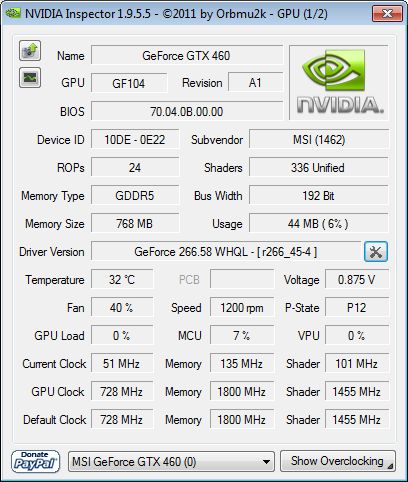
Use nvidia inspector to do this. Open nvidia inspector. Click wrench/screwdriver icon. Select Borderlands 2 in drop down. Remove Borderlands 2.exe. Save. Select Alice Madness Returns. Add Borderlands2.exe[..\steam\steamapps\common\Borderlands 2\Binaries\Win32]. Save. Play.
Sli Compatibility Bits: 0x02406405 ::: AntiAliasing Compatibility 0x200012C1
-Field of Vision[FOV]
If you are adjusting from the default in game FOV. It is recommended not to exceed 95 FOV.
Sli Compatibility Bits: 0x02406405 ::: AntiAliasing Compatibility 0x200012C1
-Field of Vision[FOV]
If you are adjusting from the default in game FOV. It is recommended not to exceed 95 FOV.
Install to...
..\steam\steamapps\common\Borderlands 2\Binaries\Win32
SHADEROVERRIDE [VERSION 1.02 OR LATER]
No Crosshair Version[Experimental]
You may have to tweak convergence to get this to work. Crosshair is removed but will reappear when right click is held down (for scoped weapons and rifles). Long story short I seperated the crosshair out as much as possible then punched a whole in the middle of hud screen. It works pretty well but it may cause certain hud elements to not show correctly when they are in same position that crosshair was in. I will not be offering additional support on this method.
..\steam\steamapps\common\Borderlands 2\Binaries\Win32
SHADEROVERRIDE [VERSION 1.02 OR LATER]
If you crash on game launcher
Right click on the game --> properties --> define Startup Commands.
Add the start command -NoLauncher , into the Steam startup commands.
Special thanks to those that helped me out. Too many names to mention and I don't want to miss anyone. A very special thanks to 3DVISION-BLOG who helped publicize for me. Really motivated me to do my best.
No Crosshair Version[Experimental]
You may have to tweak convergence to get this to work. Crosshair is removed but will reappear when right click is held down (for scoped weapons and rifles). Long story short I seperated the crosshair out as much as possible then punched a whole in the middle of hud screen. It works pretty well but it may cause certain hud elements to not show correctly when they are in same position that crosshair was in. I will not be offering additional support on this method.
..\steam\steamapps\common\Borderlands 2\Binaries\Win32
SHADEROVERRIDE [VERSION 1.02 OR LATER]
If you crash on game launcher
Right click on the game --> properties --> define Startup Commands.
Add the start command -NoLauncher , into the Steam startup commands.
Special thanks to those that helped me out. Too many names to mention and I don't want to miss anyone. A very special thanks to 3DVISION-BLOG who helped publicize for me. Really motivated me to do my best.
Friday, April 12, 2013
Aliens Colonial Marines - 3D Vision fix
Aliens Colonial Marines - 3D Vision fix.
Updated! Same link.
Last update adaptation.
Fixed remain issues.
Updated! Same link.
Fixed remaining shadows/lights issues.
Fixed remaining halos.
Fixed xeno vision in multi-player.
Fixed:
Updated! Same link.
Last update adaptation.
Fixed remain issues.
Updated! Same link.
Fixed remaining shadows/lights issues.
Fixed remaining halos.
Fixed xeno vision in multi-player.
Fixed:
- Light;
- Shadows;
- Fog/dust/fire HALOs effects ;
- HUD;
- 3D crosshair;
Remaining issues:
- minor diffuse lights issue on guns.
Instructions:
Download this archive. Unpack downloaded archive in to the folder where game .exe file (ACM.exe) located (example : "SteamGames\SteamApps\common\Aliens Colonial Marines\Binaries\Win32").
If you want to use the fix with any third-party game overlays or other DX9 hook software (or previous version crashes for you) download this version and unpack(overwrite everything if you used previous version of the fix) it in to the "Binaries\Win32 " folder where "ACM.exe" located (Important: remove d3d9.dll from the game folder if you installed previous version of the fix or fix from above). Launch "HeliXmodLauncher.exe" and run the game after.
Important: If you want to use hook version(helixmod.dll) with SweetFx(or other mods) you don't need to rename any files, just put them as is. ProxyLib doesn't work with hook version !
I - key switches(cycle) HUD depth (3 variants).
U - key switches (cycle) depth presets (3 variants).
O - key turn film grain effect off/on(default on).
Holding Mouse 2 key activate low separation preset (for good aiming from the gun)
If you want to save your custom convergence settings press "U" and select required preset, set custom separation/depth settings , then press F7 and your settings will be saved in the config file. You can set custom settings for both presets and for gun preset as well (when holding mouse button 2(aiming gun), set custom separation/depth settings and press F7. Release mouse button 2).
- Shadows;
- Fog/dust/fire HALOs effects ;
- HUD;
- 3D crosshair;
Remaining issues:
- minor diffuse lights issue on guns.
Instructions:
Download this archive. Unpack downloaded archive in to the folder where game .exe file (ACM.exe) located (example : "SteamGames\SteamApps\common\Aliens Colonial Marines\Binaries\Win32").
If you want to use the fix with any third-party game overlays or other DX9 hook software (or previous version crashes for you) download this version and unpack(overwrite everything if you used previous version of the fix) it in to the "Binaries\Win32 " folder where "ACM.exe" located (Important: remove d3d9.dll from the game folder if you installed previous version of the fix or fix from above). Launch "HeliXmodLauncher.exe" and run the game after.
Important: If you want to use hook version(helixmod.dll) with SweetFx(or other mods) you don't need to rename any files, just put them as is. ProxyLib doesn't work with hook version !
I - key switches(cycle) HUD depth (3 variants).
U - key switches (cycle) depth presets (3 variants).
O - key turn film grain effect off/on(default on).
Holding Mouse 2 key activate low separation preset (for good aiming from the gun)
If you want to save your custom convergence settings press "U" and select required preset, set custom separation/depth settings , then press F7 and your settings will be saved in the config file. You can set custom settings for both presets and for gun preset as well (when holding mouse button 2(aiming gun), set custom separation/depth settings and press F7. Release mouse button 2).
Thursday, April 11, 2013
Quantum Conundrum Updated
[Video was recorded before Depth of field removal]
Update: Went through and fixed most of remaining issues/added hud depth options. If interested in game I wrote a short review on my blog and discuss optimizations @ Ramblingsofa3DGamer.blogspot.com
Crosshair (I made it so it doesn't show when not looking at a clickable object. Pretty neat)
Effects
Removed:
Shadows(They are minimal in game since no characters. But it does cause some rooms to be brighter then intended)
Depth of Field
Issues Remaining:
Minor
If you turn 3D Vision off or start game with it off hud will disappear. Turn on and it will show again.
Optional:
Press F2: Default Hud depth
Press F3: Increase Hud depth[My preferred]
Press F4: Increase Hud depth further
INSTALLATION:
REQUIRED
Start game without patch installed. Find your optimal settings. Then Save and exit.
Go to... Documents\My Games\UnrealEngine3\TryGame\Config\Tryengine.ini
change from
AllowNvidiaStereo3d=False
to
AllowNvidiaStereo3d=True
INSTALL TO...\Steam\steamapps\common\Quantum Conundrum\Binaries\Win32
SHADEROVERRIDE
Tuesday, April 9, 2013
Unreal Tournament III
Unreal Tournament III - by mana84
Updated on April 10, 2013:
-Shadows fixed
-Health bars on nameplates fixed
notice: the game profile uses nvidia's 3d sight to change dinamically this game's crosshair depth, but it has some bugs. If you want to try my static crosshair, press '8' and disable nvidia's sight (Ctrl+F12 by default).
Description:
-Snow covers fixed
-Water shaders and water effects like little waterfalls are fixed
-Shadows are fixed
-Vehicle crosshairs, sniper scope and enemies nameplates are fixed
-Fog effects are fixed
-Added a static crosshair preset that solves the occasional crosshair at screen depth issue (i.e. while loading missiles)
-'9' and '0' keys switch preset for Hud 3d/2d
-'7' and '8' keys switch crosshair dynamic/static
If you want to modify hud depth, change the value of Const1 in the preset you like. If you need a floating point to hex converter you look at this: http://gregstoll.dyndns.org/~gregstoll/floattohex/
How to install:
Please, before using this fix read this warning.
Download:
UT3_fix.zip
extract "UT3_fix.zip" archive in the "../Unreal Tournament 3/Binaries/" folder of the game, required d3d9.dll is already included in the archive. If you have steam (like me) the path is "../Steam/SteamApps/common/Unreal Tournament 3/Binaries/".
Please, before using this fix read this warning.
Download:
UT3_fix.zip
Monday, April 8, 2013
Battlefield: Bad Company 2[DX9]
Explanation: This game is rated 3D vision ready and I saw a sale so bought for $5.00. I found it to be unplayable unless playing WAY below my desired settings. The dynamic crosshair/gunsights break with convergence at/exceeding 2D. Basically everything needs to be in depth for it to work. Then I went to find a way to remove crosshair and none exist. I'm not sure if its always been like this but anywho decided to patch it. Basically this patch will give a minimal hud for a much more cinematic/realistic experience without all the 2D hud messages every 10 seconds. If you go to play it and its fine for you just ignore this. Everyone's different but I find it to be too flat to get to work. If you're interested in my optimizations/review/comparison check my blog post HERE
Changes:
Gun crosshair is removed.
Seperate depth/convergence setting for Gun Sights[Hold right mouse button and find desired setting and click F7]
Optional:
Gun crosshair removal toggle: Press O to turn crosshair on. Press O again to turn crosshair off.
Cinematic mode. Disables a lot of non vital HUD text. Just click Y once ingame to enable. If you dont like click Y again to disable.[Reload warning/Ammo Counter/Subtitles/etc]
Issues Remaining:
Hud has issues on setup screen/Sniper rifle crosshair gone. Press Y\O to fix.
Required:
Latest Patch update: v795745
Force DX9 GUIDE HERE
Settings: Go into game then. Options->Settings->GamePlay-> UNCHECK Zoom toggle
Install to.../Battlefield Bad Company 2/
SHADEROVERIDE